

Between replay and the glow and grow comments, I am not dreading helping my kids get through their writing!

AI Tools to Assess & Grade Writing
Simplify writing assessment with Brisk with AI Tools for inspecting, grading, and evaluating student work.
01
Visualize a student's writing process
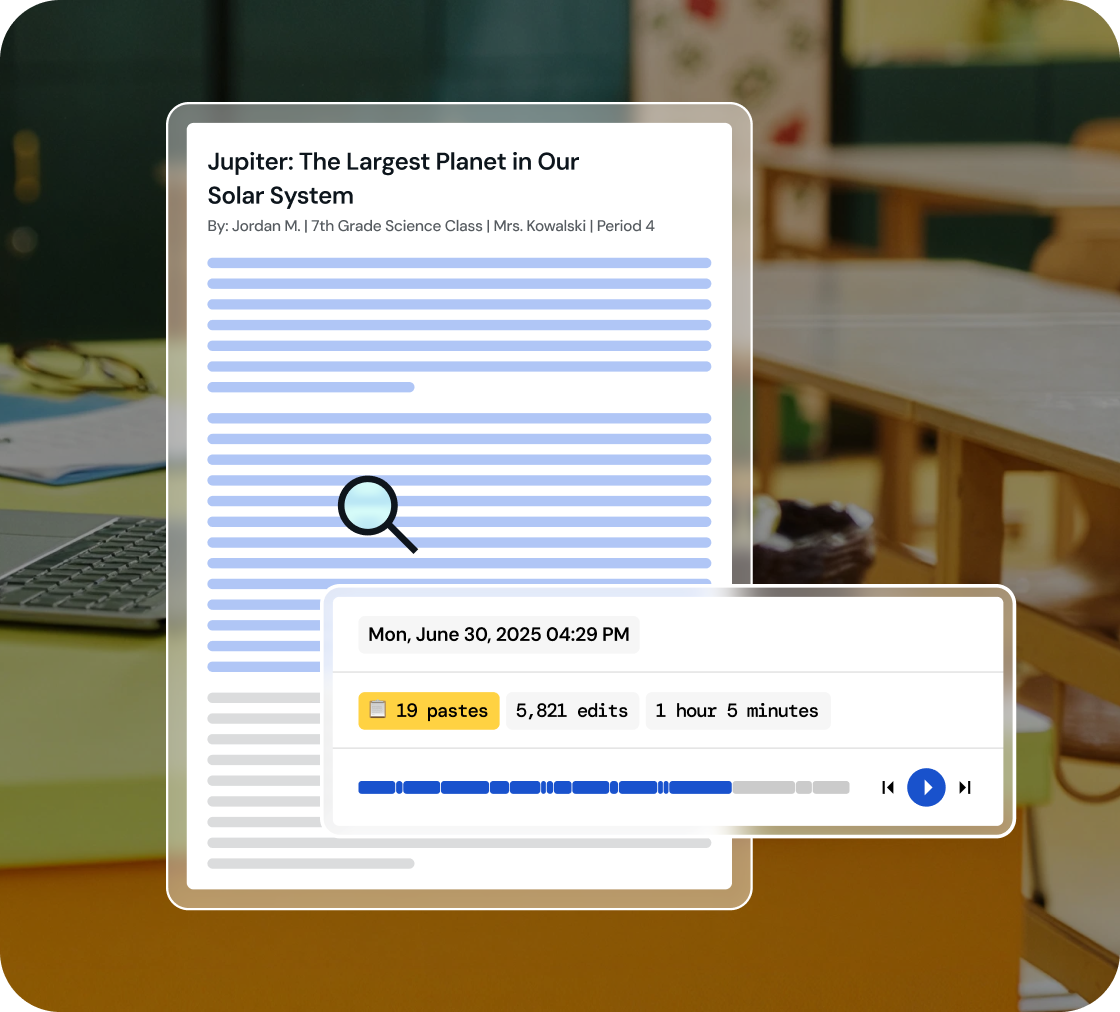
Dive into a replay of student work creation and effortlessly playback their revision journey, all within a comprehensive view.
02
Identify key writing milestones
Understand how student writing develops. Watch every stage of their process, from initial drafting and copy/pastes to the final adjustments.
03
Foster integrity in learning
Use 'Inspect Writing' to start discussions on academic honesty and nurture a culture of integrity in your classroom.
Inspect drafts, revisions, and final work
‘Inspect Writing’ shows a video-style replay of a student’s writing process from first draft to final version. See what they added, deleted, or pasted in, and how they responded to feedback. Brisk helps teachers track real-time growth and spot exactly where support is needed.
.svg)
Get a closer look at student writing practices
Through a video replay, track how students develop their writing - from copied content to sentence construction to post-feedback edits. Brisk gives teachers insight into each step of the process, making it easier to spot learning gaps and guide growth.
.png)
Engage in conversations on academic honesty
Use 'Inspect Writing' to start meaningful conversations about academic honesty in the classroom. Inspect Writing helps teachers build a culture of integrity and responsibility, making it easier to support honest academic behavior.
.png)

Lighten your day with Brisk
Thank you! Your submission has been received!
Oops! Something went wrong while submitting the form.
Frequently Asked Questions
How should I use Inspect Writing with students?
Brisk frames Inspect Writing as a tool for starting conversations. If a student's writing replay raises questions, we recommend using the moment to start a conversation about academic integrity and authorship.
Does Inspect Writing work with Google Docs?
Yes. Brisk’s Inspect Writing tool works directly within Google Docs through the Brisk Chrome extension. Students write in Docs as they normally would, and Brisk captures the process.
Is Brisk's writing inspector accurate?
Brisk doesn't produce an accuracy score. Instead, it shows you a factual record of how the document was produced.
Does Brisk detect AI-generated writing?
Yes. Brisk helps teachers understand how students wrote, not just what they turned in, which is essential for supporting academic integrity and authentic learning.
With Brisk’s Inspect Writing tool, you can watch a video-style replay of a student’s full writing process in Google Docs, from first steps to final draft. You’ll see:
- When students wrote, including timestamps and how long the work took
- What they typed, edited, added, or deleted
- Where text may have been pasted in
- How they responded to feedback and revision prompts
This helps teachers verify authentic work, understand each student’s thinking, and pinpoint exactly where support or instruction is needed.